Naming of Azure Resources (Part 1)


Context

In most demos and tutorials about Azure (and not just that) you will find a variety of resources provisioned in "fast / light" mode, that is to say without being super strict on concepts such as naming artifacts. "WebApp1", "MyVM", "MyRG" are names commonly found in demonstrations or even the "Proof-of-Concepts" (which are supposed to be much more than basic demos).
No particular concern at this point, we're supposed to be focused on the principles and concepts of the demo involved. But what about what about naming Azure artifacts when moving to a real project or an application to put into production? How do we ensure that the names we choose will be well in tune with the architectural complex context, environment, safety, operation of this application, project or system?

Naming in IT projects

First, the notion of strict naming is not specific to Azure; each IT project should follow a set of naming rules, rules that will help to properly structure the project, easily find the terms we already knew before, or even be able to identify resources exposed in lists not always structured. Naming rules are present in each programming language, in each infrastructure provisioning.
That said, there are concepts specific to the cloud (even specific to Azure) which will complement the already existing concepts. We must first catalog the list of naming aspects that is applicable for our organization, our project and our cloud.
Key principles:
Today, who said cloud, said agile mind. The cloud itself (and the public cloud in particular) is agile by his speed provisioning, scaling elasticity, and especially its fast pace of updates and new features. To respect this spirit, rules must accept flexibility. One should not be blocked to deploy a prototyping environment because, for example, the project name has not been clearly defined, or the type of artifact or resource is fresh in the cloud; however, even in this case, we should be able to easily understand afterwards in what context the resource was provisioned (if only for environment deprovisioning to avoid Azure consumption). This article will not try, so, to impose a set of rules as universal, but rather guide you how to define your own set of rules and then apply. That said, we still try to exemplify concretely (and for those who will see the example very close to their cases, apply directly the model in its state). Finally, the last "disclaimer", the dynamic spirit of the Azure will make possible that certain rules or constraints no longer apply (or are different) at the time of reading. In this case, a feedback from you will be very useful for the update of the article.  

What’s a name of an Azure resource?

Let’s start from the base: the name of a resource Azure represents a string which allows unique identification of the Azure resource.
The very general vision of this definition stops here:
  • The name itself can be a simple "code" unique, or may correspond to a "namespace" (ex. Azure Service Bus), an "account name" (ex. Azure Storage), a "hostname" (ex. Azure VM) or other specific significance to the type of resource
  • Unique identification, where? Names can have a context (scope) global public (eg. Based on an Azure subdomain, like the Azure Service Bus namespaces, Azure Storage accounts etc.), local to the subscription (eg. Azure VNET) or local to the parent resource (ex. the names of files or blobs in Azure Blob Storage container)
    • To further complicate the task, some types of resources have naming rules different for different types within the same type (difficult to understand? example: the Azure VMs have stronger constraints - maximum 15 characters - for VMs based on Windows, than on Linux. Historical issue, of course, coming from on-premises infrastructure, but that is reflected in the cloud naming).
  • The characters allowed in names also vary; but we can identify some sets of applicable characters - like below (but not limited to):
    • Alphanumeric (numbers and letters)
    • Alphanumeric plus underscore and dash
    • Alphanumeric plus underscore, dash and dot
    • Any character allowed in a URI
    • Any character
  • The majority of names cannot begin or end with a hyphen or underscore
  • Also, a particular point is the variability of case sensitivity:
    • Case sensitive names (ex. blob names in Azure Storage container)
    • Case insensitive names (eg. resource groups)
    • Mandatory lowercase names (eg. the Azure Storage accounts)
  • Length constraints are widely varying – both on the lower limit and the upper one. Certain names require between 1-64 characters other between 1-80, 2-80, 1-1024 etc.. Very, very variable, therefore, no specific marker on this.
On the whole, unfortunately there isn’t an overall view (regarding Azure, here, but AWS is suffering the same punishment, for that matter) - no overview of consolidated and (more) uniform naming rules for artifacts and resources.
Hence once again the importance of this naming structuring task. It is not unusual that you start with the rules that you consider sufficient (for the types of resources you deal with at that time) and which fall blocking for the naming of the very new resource you need in your project).

Naming constraints for Azure resources

To give you a more accurate and centralized reference for these constraints, here they are (compiled from the Azure documentation and following the requirements outlined in the resources creation process):

Resource or artifact Context (Scope) Min len Max len Case Valid character set
Resource Group Global 1 64 Insensitive Alphanumeric, underscore and hyphen
Availability Set Resource Group 1 80 Insensitive Alphanumeric, underscore and hyphen
Virtual Machine (Windows) Resource Group 1 15 Insensitive Alphanumeric, underscore and hyphen
Virtual Machine (Linux) Resource Group 1 64 Insensitive Alphanumeric, underscore and hyphen
Storage account Global 3 24 Lower cap Alphanumeric
Azure Storage Container Storage account 3 63 Lower cap Alphanumeric and hyphen
Azure Storage Blob Container 1 1024 Sensitive URL characters
Azure Storage Queue Storage account 3 63 Lower cap Alphanumeric and hyphen
Azure Storage Table Storage account 3 63 Insensitive Alphanumeric
Azure Storage File Storage account 3 63 Lower cap Alphanumeric
Virtual Network (VNet) Resource Group 2 64 Insensitive Alphanumeric, underscore, hyphen and point
Network Subnet Parent VNet 2 64 Insensitive Alphanumeric, underscore, hyphen and point
Network Interface Resource Group 1 80 Insensitive Alphanumeric, underscore, hyphen and point
Network Security Group Resource Group 1 80 Insensitive Alphanumeric, underscore, hyphen and point
Network Security Group Rule Resource Group 1 80 Insensitive Alphanumeric, underscore, hyphen and point
Route table Resource Group 1 80 Insensitive Alphanumeric, underscore, hyphen and point
ExpressRoute Circuit Resource Group 1 80 Insensitive Alphanumeric, underscore, hyphen and point
Public IP Address Resource Group 1 80 Insensitive Alphanumeric, underscore, hyphen and point
Load Balancer Resource Group 1 80 Insensitive Alphanumeric, underscore, hyphen and point
Load Balanced Rules Config Load Balancer 1 80 Insensitive Alphanumeric, underscore, hyphen and point
App Service Plan Subscription 2 40 Insensitive Alphanumeric
Web App Global 2 60 Insensitive Alphanumeric and hyphen
Function Global 2 60 Insensitive Alphanumeric and hyphen
Mobile App Global 2 60 Insensitive Alphanumeric and hyphen
Logic App Global 2 60 Insensitive Alphanumeric and hyphen
API App Global 2 60 Insensitive Alphanumeric and hyphen
App Service Environment Global 2 60 Insensitive Alphanumeric and hyphen
App Service Certificate Global 3 15 Insensitive Alphanumeric
API Management Global 1 50 Insensitive Alphanumeric
Notification Hub Subscription 1 260 Insensitive Alphanumeric, underscore, hyphen and point
Notification Hub Namespace Global 2 50 Insensitive Alphanumeric and hyphen
SQL Database Subscription 1 28 Insensitive Alphanumeric, underscore and hyphen
SQL Server Global 1 63 Lower cap Alphanumeric and hyphen
SQL Data Warehouse Database Subscription 1 28 Insensitive Alphanumeric, underscore and hyphen
Document DB Global 3 50 Lower cap Alphanumeric and hyphen
Redis Cache Global 1 63 Insensitive Alphanumeric and hyphen
Search Service Global 2 60 Lower cap Alphanumeric and hyphen
Power BI Workspace Collection Subscription 3 64 Insensitive Alphanumeric and hyphen
Cognitive Services Account Subscription 2 64 Insensitive Alphanumeric, underscore and hyphen
Data Catalog Subscription 2 26 Insensitive Alphanumeric
HDInsight Cluster Global 1 59 Insensitive Alphanumeric and hyphen
Machine Learning Workspace Subscription 3 24 Insensitive Alphanumeric and hyphen
Data Factory Subscription 3 64 Insensitive Alphanumeric and hyphen
Event Hub Subscription 1 50 Insensitive Alphanumeric, underscore and hyphen
Service Bus Namespace Global 6 50 Insensitive Alphanumeric and hyphen
Service Bus Queue Subscription 1 50 Insensitive Alphanumeric, underscore and hyphen
Service Bus Topic Subscription 1 50 Insensitive Alphanumeric, underscore and hyphen
Stream Analytics Job Subscription 3 63 Insensitive Alphanumeric and hyphen
IoT Hub Subscription 3 50 Insensitive Alphanumeric and hyphen
Traffic Manager Global 1 63 Insensitive URL characters
Media Service Account Global 3 24 Lower cap Alphanumeric
CDN Profile Global 1 ? Insensitive Alphanumeric and hyphen
Azure AD Domain Global 1 27 Insensitive Alphanumeric
Azure AD Subscription 1 256 Insensitive Any character
Team Services Account Global 1 50 Insensitive Alphanumeric and hyphen
Team Project Account 1 65 Insensitive Alphanumeric and hyphen
DevTest Labs Subscription 1 27 Insensitive Alphanumeric, underscore, hyphen and parenthesis
Application Insights Subscription 1 255 Insensitive Any except 3 characters
Automation Account Subscription 6 50 Insensitive Alphanumeric and hyphen
Recovery Services Vault Subscription 2 50 Insensitive Alphanumeric and hyphen
Scheduler Job Subscription 1 260 Insensitive Alphanumeric, underscore and hyphen
Scheduler Job Collection Subscription 1 100 Insensitive Alphanumeric, underscore and hyphen
Cloud Service Global 1 63 Insensitive Alphanumeric and hyphen
Batch Account Global 3 24 Lower cap Alphanumeric
BizTalk Service Global 6 20 Lower cap Alphanumeric
Mobile Engagement Collection Global 2 50 Insensitive Alphanumeric and hyphen
Mobile Engagement App Resource Global 1 50 Insensitive Alphanumeric, underscore and hyphen
Mobile Engagement Application Subscription 1 ? Insensitive Any character
RemoteApp Collection Subscription 3 13 Insensitive Alphanumeric
Key Vault Global ? ? Insensitive Alphanumeric and hyphen
Operations Mgmt Suite Namespace Global 4 24 Insensitive Alphanumeric and hyphen
Tag Name Resource 1 512 Insensitive Alphanumeric
Tag Value Resource 1 256 Insensitive Alphanumeric

Follow-up

This first article about the naming of Azure resources and artifacts will be followed soon by other items, which will include details of the aspects or particles included in the names, reference charts of particles, composition rules and the good practices. Note: you will find the French version of this article at: http://blog.cellenza.com/cloud-2/azure/partie-1-nommage-ressources-azure/.


Azure App Service Environment – error on creating a new Web App

When creating a new Web App hosted inside an App Service Environment (ASE) via an ARM template, you may encounter the following error:

"Resource Microsoft.Web/sites 'yourapplication-web01' failed with message 'Server farm with name yourappserviceplan not found.' ". Here is the reference line in the template: "serverFarmId": "/subscriptions/xxxxxxx-xxxx-xxxx-xxxx-xxxxxxxxxx/resourceGroups/yourresourceid/providers/Microsoft.Web/serverfarms/ yourappserviceplan".

(where: yourapplication-web01 = the name of your web app,  yourresourceid = the name of your resource group, yourappserviceplan = the name of your app service hosting plan)

This error comes usually from an insufficient information in the ARM template you are trying to deploy. If in a Web App deployment outside ASE it is enough to reference the hosting plan which hosts the application, within an ASE you need to specify also the information for referencing the ASE environment which includes the hosting plan:

[template segment for the web app definition]

  {

      "apiVersion": "2015-08-01",
      "name": "[parameters('siteName')]",
      "type": "Microsoft.Web/sites",
      "location": "[parameters('location')]",
      "tags": {
        "displayName": "[parameters('siteName')]"
      },
      "properties": {
        "name": "[parameters('siteName')]",
        "hostingEnvironment": "[parameters('environmentName')]",
        "hostingEnvironmentId": "[resourceId('Microsoft.Web/hostingEnvironments', parameters('environmentName'))]",
        "serverFarmId": "[resourceId('Microsoft.Web/serverfarms', parameters('hostingPlanName'))]"
      }
    }

So for the parametering aspect, you will need to include the hosting plan name ('hostingPlanName') as well as the ASE name ('environmentName').

Note: if the web site will be deployed in a different resource group, then you will need to qualify the resource references with their resource group name:
"serverFarmId": "[resourceId(parameters('hostingPlanResourceGroupName'), 'Microsoft.Web/serverfarms', parameters('hostingPlanName'))]"

That’s all. Have a good deployment!


Connect() 2015

L'événement Connect() se tiendra du 18 au 19 Novembre à New York MVP. L'événement est surtout axé sur les outils de développement, mais couvrira également le contenu sur Microsoft Azure, le développement de bureau et autres. Scott Guthrie sera prononcera le discours et il est rejoint par une gamme d'orateurs passionnants. L'événement sur le site est sur invitation seulement, mais l'événement sera la diffusion en direct de New York pour les développeurs du monde entier.
• Vous pouvez participer à cet événement virtuel, il suffit de cliquer 'Save the Date': http://connect2015.visualstudio.com/
• Vous pouvez suivre l'événement à travers vos canaux de médias sociaux, Twitter en utilisant le hashtag ‪#‎connect2015‬
• Vous pouvez également suivre directement ci-dessous l'évènement:


P-SELLER : sur scène à WPC 2015


Plus besoin de détailler qu'est-ce que WPC, sauf éventuellement l'acronyme lui même : Microsoft Worldwide Partner Conference - 2015 (Orlando, FL).
J'ai l'honneur d'y représenter la France et mon entreprise, Econocom, en tant que speaker partenaire dans la session: CA04 : Accelerating Growth in Corporate Accounts . Session très intéressante focalisée sur le rôle du programme P-SELLER dans le partenariat Microsoft. Je vous invite d'y participer si vous êtes à WPC, je parlerai de mon expérience dans le programme, mais aussi des modalités et astuces de gagner en tant que partenaire dans le business Azure. Je vous attends !

Global Azure Bootcamp Paris 2015


Samedi prochain, 25 avril 2015, comme chaque année dans cette période, il y aura Global Azure Bootcamp, événement ayant rassemblé à travers le monde et le même jour 7432 personnes, 154 Speakers, 96 villes, 194 sessions techniques et 74 MVP.
En France, l'évènement se tiendra à la fois à Paris et Lyon. Pour Paris - où vous pourrez me rencontrer - vous trouverez les informations logistiques ici.

QUEL PROGRAMME ?

Des sessions techniques sur Azure se tiendront toute la journée.
Des environnements de laboratoires Microsoft Azure seront mis en place ad-hoc. Les experts seront à vos côtés pour vous apporter le support nécessaire à votre initiation dans le Cloud ou, au contraire, pour donner vie à vos expériences techniques les plus folles sur la plateforme Azure.

Agenda du jour :
Track 1
Track 2
9H
Accueil
9H30
Keynote
10H35
Nouveautés sur le stockage de données dans Azure
Atelier : Science Lab Azure Bootcamp
11H25
Concevoir une architecture distribuée avec Azure WebJobs
12H10
Déjeuner
13H10
Azure IoT
Atelier : Machine Learning
14H00
Pourquoi le Cloud Azure pour votre stratégie eCommerce et digitale ?
15H10
Premiers pas avec Azure Search
Atelier : Racing Lab
16H00
Automati(sati)on de votre application Azure
16H50
Clôture
 

 Voici la session que je présenterai ensemble mon collègue Maxime Launay:
Automati(sati)on de votre application Azure. Passage sur les solutions d'automatisation des processus Azure. Moment pour discuter, bien sûr, d'Azure Automation, mais aussi  PowerShell DSC. D'autres surprises à venir.

Venez nombreux !


Evaluation des solutions de Monitoring sur AZURE


Décidément, pas un mois sans une nouvelle contribution – et un nouveau contributeur – sur ce blog Azure : voici l’article très intéressant signé Hervé-Richard Elie qui s’inscrit dans la suite de l’article introductif L’infogérance des environnements Azure avec Operational Insights. Bonne lecture !

Le nouvel outil de monitoring de Microsoft « Operational Insights » a été présenté lors des derniers Techdays 2015 comme une réelle avancée qui permettra au gestionnaire de SI d’avoir une vision simple et claire de l’état de santé de son infrastructure. Les solutions de monitoring sont de plus en plus verbeuses et donc gourmandes en consommation de data. Nous sommes dans l’ère du Big Data et les SI ont besoin d’acquérir rapidement des informations utiles et cohérentes dans le flot de data.

Cette solution est-elle orientée purement pour un besoin sur l’activité Clouding ? Est-ce qu’on peut se passer d’une infrastructure SCOM ? Disposons-nous de solutions adaptés aux services Cloud tel qu’IAAS et PAAS ?

clip_image002

Docker dans Azure


Azure Loves Linux, comme je disais Smile
L’article suivant est la contribution 100% de mon collègue Maxime Launay, enthousiaste et passionné du Cloud Azure.
Voici cet article dans son intégralité – Merci Maxime !


Cet article présente la mise en place, en ligne de commande, d’une plateforme de développement hébergée sur Microsoft Azure et utilisant Redmine, Jenkins et Gitlab via la technologie de conteneur Docker. Attention, il ne présente pas la création d’un container Docker, uniquement son utilisation.

Contexte

Fin 2014, un client m’a sollicité pour mettre en place une plateforme de développement Open Source. Ces besoins étaient très précis :
- Déployer rapidement ;
- Utiliser git comme contrôleur de code source ;
- Utiliser Jenkins comme outils d’Intégration Continue ;
- Utiliser Redmine comme bug tracker ;
- Conserver « la main » sur les environnements ;
- Limiter les coûts de mise en place et d’exploitation ;
- Avoir des procédures d’installation simples permettant une reconstruction rapide de l’environnement.
Pour l’hébergement, l’utilisation du Cloud Public m’a semblé parfaitement adaptée aux besoins et comme le client avait des affinités avec Microsoft Azure, la décision fut rapide. Pour répondre aux autres besoins, j’ai tout de suite pensé à l’utilisation d’un « petit » projet qui monte, Docker. Je me décidais donc à franchir le pas pour vérifier l’intérêt du couple Azure / Docker.

L’infogérance des environnements Azure avec Operational Insights

Azure Operational Insights est une toute nouvelle offre de service type SaaS - actuellement en preview (bêta) - qui permet de monitorer, capturer, gérer et analyser les informations venant de votre système informatique concernant la configuration, la performance, la capacité, le bon état de santé, les incidents de tout type, les mises à jour, les changements au niveau logiciel.
image
OpInsights – comme nommé plus brièvement – se base sur l’ancienne offre System Center Advisor, qui a été en échange revue et élargie comme fonctionnalité. Ce service cible des environnements à demeure ou cloud et est censé à compléter – ou remplacer même – System Center Operations Manager. Il peut travailler en tandem avec SCOM mais également se dispenser de tout outil d’analyse de monitoring traditionnel.
Comment ça fonctionneComme vous allez voir, un agent installé dans votre environnement (sur les machines à monitorer) enverra des informations vers le service OpInsights. Le type d’informations capturées et envoyées variera en fonction des différentes fonctionnalités que vous activez (Log Management, Update Assessment, Change Tracking ou autres). Ensuite vous pouvez utiliser ces informations via des outils très puissants d’analyse et via des ergonomies adaptées.
Démonstration
En étant ici dans un blog focalisé 100% sur Azure, nous utiliserons Operational Insights pour gérer des environnements hébergés dans Azure. Encore plus, aujourd’hui nous discuterons précisément des environnements type IaaS (Infrastructure-as-a-Service).
Notre but sera donc de monitorer 2 VMs standard Azure hébergés en Europe (à Dublin), à l’aide d’Azure Operational Insights.
Les étapes principales seront:
1. Ouverture d’un espace de travail OpInsights
2. Installation de l’agent et configuration des machines cible
3. Activation des Intelligent Packs OpInsights
4. Suivi de l’activité opérationnelle
Allons-y:

Using Azure Resource Manager within Azure Automation


I am publishing here an extract of a post on MSDN Forums, about the utilization of Azure Resource Manager within Azure Automation.

The answer to the question asked in this post, given by Joe Levy, a Microsoft employee, is more important than the original thread. It may be a temporary solution, but also a long term one (if the ARM module will not be exposed by default in Azure Automation).

Here it is:


·        We do not ship the Azure Resource Manager module out of the box yet in Azure Automation like we do the Azure (AzureServiceManagement) module. We have done some limited testing on the ARM module in Azure Automation. If you would like to import this module yourself, here are the steps to get ARM set up in Azure Automation:
Step 1 – Create an Azure Automation Integration Module from the AzureResourceManager PowerShell module.
Navigate to the AzureResourceManager module within the Azure PowerShell directory on a host with Azure PowerShell installed.

Zip up the AzureResourceManager folder.
Step 2 – Import into Azure Automation
Importing this zip as an integration module into Azure Automation works fine as the below screenshots show:

Step 3 – Write a Runbook that uses AzureResourceManager functionality
Like you normally would, except no need to use Switch-AzureMode to switch between AzureServiceManagement and AzureResourceManager, as both AzureServiceManagement and AzureResourceManager modules are now in the PS path.


Thanks, Joe!

Azure VNET to VNET VPN, across regions and data centers: not so complicated

After finding very interesting articles like this one (thanks, Matt Davies) around recently announced features on Azure, I wanted to push further the IaaS  experience on Microsoft’s public cloud by connecting multiple Azure virtual networks simultaneously, eventually across data centers. The utilization of this functionality becomes quickly interesting in various scenarios, like geo-highly available applications and disaster recovery plans.

So here is my scenario: let’s say we need 1 VNET in North Europe region (Dublin) to be connected to a second VNET  in the same datacenter and to a third one in West Europe (Amsterdam). We will test the result simply by pinging between 3 VMs, one in each VNET.

image

Assumption: in order to keep this article to a reasonable size, I assume you are somehow familiar already with the main (Azure) IaaS concepts (VNET, VPN, VM, Local Network …).

Azure SQL Database : scénario de reprise d'activité et performance avec la géo-réplication active

Parmi des centaines des fonctionnalités arrivant en masse sur le Cloud Azure, voici une qui simplifiera la vie des responsables IT: la géo-réplication des bases de données SQL Database. Comme démontré ci-dessous, nous pourrons utiliser cette fonctionnalité pour augmenter le niveau de disponibilité de votre application et la préparer pour les cas de catastrophe (“disaster recovery”).  Mais la géo-réplication peut servir également à l'amélioration de la performance applicative.

Scénario de reprise d’activité

La nouvelle structure des éditions SQL Database (actuellement en preview public) est composée des niveaux Basic, Standard et Premium. L’édition Premium inclut la fonctionnalité dite de géo-réplication active: pour une base de données hébergée sur un serveur qui se trouve dans une sous-région (datacenter) Azure (ex. Europe / Dublin), il y a l’option d’associer un réplica hébergée dans un autre data center de la même région (dans ce cas-là: Europe / Amsterdam).
Ce réplica sera synchronisé en permanence et de manière transparente avec la base originelle et fera en sorte qu’en cas d’indisponibilité du datacenter source, pour pourrez faire rapidement basculer votre application vers le datacenter destination.
(en l’occurrence, vous aurez les machines virtuelles / les services applicatifs hébergés dans le datacenter destination et prévus à se connecter à la base de données réplica.)

PATRONS DE CONCEPTION CLOUD / AZURE (2ème partie)

Il y a quelque jours, j’avais publié PATRONS DE CONCEPTION CLOUD /AZURE (1ère partie).
Voici la suite de la liste des plus importants modèles de conception (design patterns) concernant le Cloud:

13. Patron: LEADER ELECTION (Election du leader)

image_thumb16
Permet coordonner les actions effectuées par une collection d’instances collaboratives de tâches dans une application distribuée en élisant un cas comme le leader qui assume la responsabilité de la gestion des autres cas.
Ce modèle peut aider à s'assurer que les tâches ne sont pas en conflit les uns avec les autres, provoquer des conflits pour les ressources partagées, ou interférer par inadvertance avec le travail que d'autres instances de tâche exécutent.
Solution Azure: code custom (pas de solution dans l’état sur Azure)

PATRONS DE CONCEPTION CLOUD / AZURE (1ère partie)

Suite à l’accélération rapide de l’utilisation du Cloud dans les solutions informatiques, un besoin de mieux organiser la conception et l’assemblage les solutions se profile. Bien que les modèles qui se définissent ne sont pas nécessairement spécifiques au Cloud Computing, mais aux approches systématiques SOA, [Big] Data ou autres, il y a bien des nouveaux cas apparus avec les architectures spécifiques Cloud (et plus particulièrement cloud public), sans dire que les modèles qui étaient plus au moins appliqués dans déploiements à demeure devient impératifs dans le contexte cloud.
Cette liste est censée à donner une vision unitaire et synthétique autour de ces « patrons », avec typiquement un schéma conceptuel, une définition / description, ainsi que des exemples d’application en utilisant le cloud public Microsoft Azure.
A noter qu’ici on parle d’abord des patrons de conception (design patterns), et pas (pour l’instan) des patrons de développement ou d’architecture (qui seront sujet des articles ultérieurs).

1. Patron: CACHE-ASIDE (mise en cache à-côté)

clip_image003
A la demande, charge des données provenant d’une structure de données et les garde disponible pour utilisation.
Ce modèle peut améliorer les performances et aide à maintenir la cohérence entre les données contenues dans le cache et les données dans le magasin de données sous-jacent.
Solution Azure : AZURE CACHE

Global Azure Boot Camp Paris 2014

Samedi 29 Mars, je serai à Global Windows Azure Boot Camp 2014 - Paris, événement mondial  Azure organisé en France par la communauté Azure ZeCloud.

Je serai là en tant que (co)speaker dans 2 sessions:

Heure Session  Speakers
10h15 - 11h00 Patterns Cloud / Azure Marius Zaharia
16h00 - 16h45 Internet of things, ou les objets connectés... au Cloud Aymeric Weinbach &
Marius Zaharia

Tous les passionnés du Cloud Azure sont invités d'être présents, l'événement s'annonce très intéressant - et en plus est totalement gratuit !

Let Azure Rock!

Désormais, mon blog sera majoritairement dédié au Cloud Computing et à Windows Azure en particulier. Il y sera la place pour discuter sur toute la plage des plateformes, services et technologies associées (Microsoft en principal).
Egalement, ce blog sera une tribune de mes pensées et positions concernant ce concept révolutionnaire en informatique qui est le Cloud.

J'en profite pour partager ici une adresse Twitter: @marius_on_azure, également consacrée aux même but. N'hésitez pas de la suivre!

-----------------------------------------------------------------------------------------------------------

From now on, my blog will be mostly exclusively dedicated to the Cloud Computing topics and to Windows Azure in particular. It will be the place for discussing and exchanging on a whole range of platforms, services and technologies associated to this (Microsoft mainly).
Also, it will be the tribune of my thoughts regarding this revolutionary concept which is the Cloud.

I will share here with you a new Twitter address: @marius_on_azure, dedicated to the same goal. Go and follow it!

TechEd Europe 2013 - Madrid

Entre 24-28/06 je suis présent à Madrid pour TechEd Europe 2013.
En parallèle, la conférence BUILD 2013 se met aussi en marche.

Plein des nouveautés et des sessions intéressantes sur le Cloud Azure - ainsi que sur le Cloud privé (sur le côté infrastructure) et au niveau de l'intégration on/off premises - sont en train de s'annoncer.
J'essayerai par la suite de cataloguer ces nouveautés et l'ensemble des features et fonctionnalités Azure.

A très bientôt !

---------------------------------------

Between 24-28 of June, I am present at Madrid for TechEd Europe 2013.
In parallel, the 2013th edition of BUILD conference is running in the same week.

There will be plenty of interesting news and sessions related to the Azure Cloud, as well as on the private Cloud and on on/off premises integration aspects.
I will try to create a catalog of this news and of the whole set of Azure features and functionalities.

See you soon!


[Azure News] Enfin ! Les Machines Virtuelles Azure en production


Après environ 10 mois de leur publication limitée, les services Windows Azure Virtual Machines (a.k.a. Azure IaaS) ont été rendus disponibles pour l'utilisation en mode pleine production, avec notamment un contrat de disponibilité de service garanti financièrement par Microsoft. Attention, toute de même: la disponibilité de 99,95% (l'équivalent à 21 minutes d'arrêt maximum par mois) d'est assurée que pour des groups balancées de 2 ou plusieurs machines.

Les VMs peuvent être créées à partir des images préexistantes OS nu, ou avec des produits préinstallés, fournis par  Microsoft ou par des tiers. Egalement, les VMs peuvent être basées sur des disques (VHD) existants on-premises et téléchargés sur Azure ensuite. Parmi les images préexistantes, à noter la présence des produits serveur importants, comme SQL Server 2013, SharePoint Server 2013, ou bien BizTalk Server 2013. Encore un signe d'attention: quand vous testez un tel produit, prenez une version d'évaluation; sinon, renseignez-vous bien au niveau du prix des licences inclus - vous louerez en effet le produit, à un montant horaire, qui apparaitra sur votre facture.

 image


Le service de réseau virtuel Azure Networking est également passé en mode production. Cela permet de monter dans le cloud Azure des systèmes informatiques complètes, en mode IaaS, PaaS ou combiné. Egalement, cela permet l'implémentation de systèmes hybrides on-premises & cloud (ou passage progressif vers le cloud), integrés via des réseaux virtuels typeVPN.

La surprise est venue avec l'annonce simultanée d'une baisse des prix importante (21-33%) pour la majorité des services Azure. Conformément à Microsoft, il y aura dès maintenant un alignement des prix avec les services similaires d'Amazon - tout en fournissant un panel plus complet, avec la forte présence des features pure PaaS (web/worker roles, notamment).

[Azure News] Azure Media Services disponibles en production

Après une court stage de Preview (Beta), les "Services de média" Windows Azure (comme nommés en français) sont lancés il y a quelques jours en production.

C'est un mouvement plutôt inattendu : il y avait d'autres services - comme par ex. "Ordinateurs Virtuels", le IaaS d'Azure - qui étaient perçus comme plus proches de la release en "General Availability". Il parait que la diffusion de média autour des Jeux Olympiques de Londres 2013 a beaucoup aidé à la stabilisation rapide du service, et donc le-voilà disponible pour le vrai travail.

clip_image001

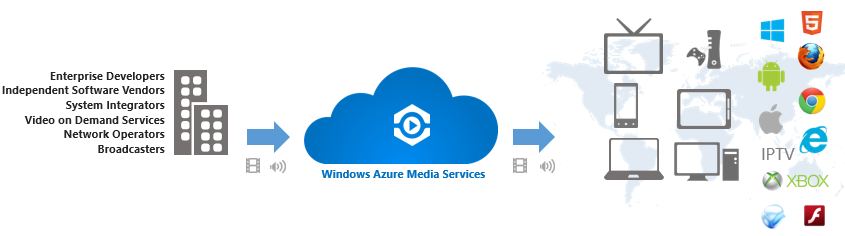
Aujourd'hui, nous avons à disposition une plateforme complète de média, incluant hébergement (scalable et élastique), encodage (en multiple formats possibles), streaming (vers différentes plateformes client ou devices parmi lesquels on cite Windows 8, Windows Phone, HTML5, Android OS, Apple iOS, Xbox, Flash, Silverlight et autres) et la gestion complète de toutes ces actions via des API type REST ou des kits de développement (SDK) dédiés.

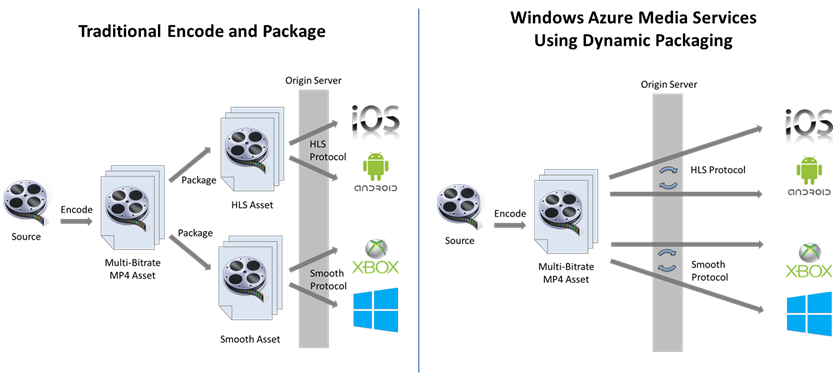
Un élément particulier est lié au mode d’encodage et streaming. Si dans un modèle traditionnel, à partir de la source on prépare plusieurs packages typiquement dédiées aux technologies différentes de streaming, Azure Media Services utilise ce qu’on appelle le packaging dynamique: à partir d’un asset unique, le service est capable d’envoyer de flux transformés à la volée et adaptés aux formats supportés (voir ci-dessous).

image

Avec ceci, le temps et l’effort (lire cout) d’encodage, ainsi que le cout de stockage des média sont beaucoup réduits.

La nature modulaire du service lui donne la flexibilité de rajouter dans l’avenir ainsi des nouveaux formats d’entrée que des nouveaux standards de flux sortant.

Références: page officielle; billet d'annonce; Centre de développement Media Services; aide MSDN; forum MSDN

Gare au... Middleware

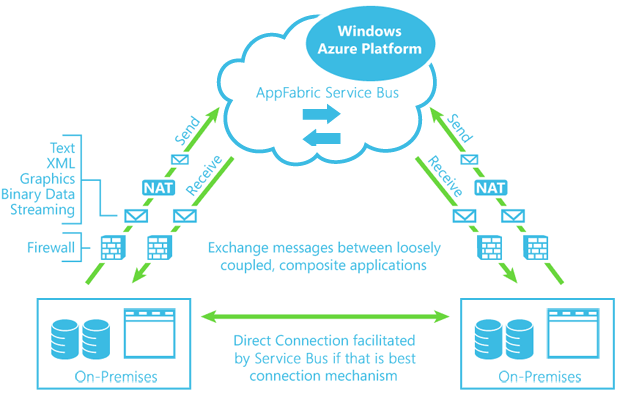
Je démarre, avec cet article,  une série dédiée a Windows Azure Service Bus en particulier et au "middleware" en général.
I will start, with this article, a series dedicated to Windows Azure Service Bus in particular, and to the "middleware" in general.
Azure AppFabric Service Bus
Ce ne seront pas des Hello World: le but est d'affranchir ce pas et montrer notamment des cas d'utilisation du monde réel, du vrai métier, quoi.
Pour autant, on parlera essentiellement de la technique, ainsi de point de vue conception/architecture, que des détails d'implémentation et développement.

J'essayerai au maximum de structurer la suite pour donner une vision cohérente et comprehensive.

Bonne "lecture" :)
It won't be a Hello World series. The goal is to cross the line and attack real world scenarios, with real business cases there.
However, the content will be focused mainly on technique, either on aspects on design/architecture and implementation/development.

I will try to have the "speech" well structured in order keep it coherent and comprehensive.

Enjoy your "reading" :)